
Access control
Updated
Two mechanisms compose: roles, which are organization-wide, and grants, which are per project and per environment.
Roles
Every action has a permission. A role is a bag of those permissions. Category
*.admin expands to every action in that group at check time
(audit.admin covers audit.read and audit.export).
projects.view_all is a scope bypass, not part of projects.admin.
We seed four defaults on every organization. Enterprise can edit Admin, Developer, and Viewer, or create new roles. Owner always has the full catalog and cannot be changed.
| Permission | Owner | Admin | Developer | Viewer | Owner |
|---|---|---|---|---|---|
| ✓ | ✓ | · | · | 2 | |
| ✓ | ✓ | · | · | ✓ | |
| ✓ | ✓ | · | · | ✓ | |
| ✓ | · | · | · | 4 | |
| ✓ | · | · | · | ✓ | |
| ✓ | · | · | · | ✓ | |
| ✓ | · | · | · | ✓ | |
| ✓ | · | · | · | ✓ | |
| ✓ | · | · | · | 3 | |
| ✓ | · | · | · | ✓ | |
| ✓ | · | · | · | ✓ | |
| ✓ | · | · | · | ✓ | |
| ✓ | · | · | · | 3 | |
| ✓ | · | · | · | ✓ | |
| ✓ | · | · | · | ✓ | |
| ✓ | · | · | · | ✓ | |
| ✓ | · | · | · | 2 | |
| ✓ | · | · | · | ✓ | |
| ✓ | · | · | · | ✓ | |
| ✓ | · | · | · | 3 | |
| ✓ | · | · | · | ✓ | |
| ✓ | · | · | · | ✓ | |
| ✓ | · | · | · | ✓ | |
| ✓ | · | · | · | 4 | |
| ✓ | · | · | · | ✓ | |
| ✓ | · | · | · | ✓ | |
| ✓ | · | · | · | ✓ | |
| ✓ | · | · | · | ✓ | |
| ✓ | · | · | · | 3 | |
| ✓ | · | · | · | ✓ | |
| ✓ | · | · | · | ✓ | |
| ✓ | · | · | · | ✓ | |
| ✓ | ✓ | · | · | 6 | |
| ✓ | ✓ | · | · | ✓ | |
| ✓ | ✓ | · | · | ✓ | |
| ✓ | ✓ | · | · | ✓ | |
| ✓ | ✓ | · | · | ✓ | |
| ✓ | ✓ | · | · | ✓ | |
| ✓ | ✓ | · | · | ✓ | |
| ✓ | ✓ | · | · | 4 | |
| ✓ | ✓ | · | · | ✓ | |
| ✓ | ✓ | · | · | ✓ | |
| ✓ | ✓ | · | · | ✓ | |
| ✓ | ✓ | · | · | ✓ | |
| ✓ | ✓ | · | · | 7 | |
| ✓ | ✓ | · | · | ✓ | |
| ✓ | ✓ | · | · | ✓ | |
| ✓ | ✓ | · | · | ✓ | |
| ✓ | ✓ | · | · | ✓ | |
| ✓ | ✓ | · | · | ✓ | |
| ✓ | ✓ | · | · | ✓ | |
| ✓ | ✓ | · | · | ✓ | |
| ✓ | ✓ | · | · | 4 | |
| ✓ | ✓ | · | · | ✓ | |
| ✓ | ✓ | · | · | ✓ | |
| ✓ | ✓ | · | · | ✓ | |
| ✓ | ✓ | · | · | ✓ | |
| ✓ | ✓ | · | · | 6 | |
| ✓ | ✓ | · | · | ✓ | |
| ✓ | ✓ | · | · | ✓ | |
| ✓ | ✓ | · | · | ✓ | |
| ✓ | ✓ | · | · | ✓ | |
| ✓ | ✓ | · | · | ✓ | |
| ✓ | ✓ | · | · | ✓ | |
| ✓ | ✓ | · | · | 5 | |
| ✓ | ✓ | · | · | ✓ | |
| ✓ | ✓ | · | · | ✓ | |
| ✓ | ✓ | · | · | ✓ | |
| ✓ | ✓ | · | · | ✓ | |
| ✓ | ✓ | · | · | ✓ | |
| ✓ | ✓ | · | · | 5 | |
| ✓ | ✓ | · | · | ✓ | |
| ✓ | ✓ | · | · | ✓ | |
| ✓ | ✓ | · | · | ✓ | |
| ✓ | ✓ | · | · | ✓ | |
| ✓ | ✓ | · | · | ✓ | |
| ✓ | ✓ | · | · | 3 | |
| ✓ | ✓ | · | · | ✓ | |
| ✓ | ✓ | · | · | ✓ | |
| ✓ | ✓ | · | · | ✓ | |
| ✓ | ✓ | ✓ | · | 5 | |
| ✓ | ✓ | · | · | ✓ | |
| ✓ | ✓ | ✓ | · | ✓ | |
| ✓ | ✓ | ✓ | · | ✓ | |
| ✓ | ✓ | ✓ | · | ✓ | |
| ✓ | ✓ | · | · | ✓ | |
| ✓ | ✓ | ✓ | · | 7 | |
| ✓ | ✓ | · | · | ✓ | |
| ✓ | ✓ | ✓ | · | ✓ | |
| ✓ | ✓ | · | · | ✓ | |
| ✓ | ✓ | · | · | ✓ | |
| ✓ | ✓ | · | · | ✓ | |
| ✓ | ✓ | · | · | ✓ | |
| ✓ | ✓ | · | · | ✓ | |
| ✓ | ✓ | · | · | 3 | |
| ✓ | ✓ | · | · | ✓ | |
| ✓ | ✓ | · | · | ✓ | |
| ✓ | ✓ | · | · | ✓ | |
| ✓ | ✓ | · | · | 4 | |
| ✓ | ✓ | · | · | ✓ | |
| ✓ | ✓ | · | · | ✓ | |
| ✓ | ✓ | · | · | ✓ | |
| ✓ | ✓ | · | · | ✓ | |
| ✓ | ✓ | · | · | 3 | |
| ✓ | ✓ | · | · | ✓ | |
| ✓ | ✓ | · | · | ✓ | |
| ✓ | ✓ | · | · | ✓ | |
| ✓ | ✓ | ✓ | · | 4 | |
| ✓ | ✓ | · | · | ✓ | |
| ✓ | ✓ | ✓ | · | ✓ | |
| ✓ | ✓ | ✓ | · | ✓ | |
| ✓ | ✓ | ✓ | · | ✓ | |
| ✓ | ✓ | ✓ | · | 4 | |
| ✓ | ✓ | · | · | ✓ | |
| ✓ | ✓ | ✓ | · | ✓ | |
| ✓ | ✓ | ✓ | · | ✓ | |
| ✓ | ✓ | · | · | ✓ | |
| ✓ | ✓ | · | · | 7 | |
| ✓ | ✓ | · | · | ✓ | |
| ✓ | ✓ | · | · | ✓ | |
| ✓ | ✓ | · | · | ✓ | |
| ✓ | ✓ | · | · | ✓ | |
| ✓ | ✓ | · | · | ✓ | |
| ✓ | ✓ | · | · | ✓ | |
| ✓ | ✓ | · | · | ✓ | |
| ✓ | ✓ | · | · | 5 | |
| ✓ | ✓ | · | · | ✓ | |
| ✓ | ✓ | · | · | ✓ | |
| ✓ | ✓ | · | · | ✓ | |
| ✓ | ✓ | · | · | ✓ | |
| ✓ | ✓ | · | · | ✓ | |
| ✓ | ✓ | · | · | 2 | |
| ✓ | ✓ | · | · | ✓ | |
| ✓ | ✓ | · | · | ✓ |
A filled cell is in the stock bag. A lighter check is covered by that category's *.admin. Click a category admin row to highlight every action it covers. Click a role header to focus that bag.
Roles alone do not grant access to a project's secrets. A Developer with no grant sees no projects at all.
Grants
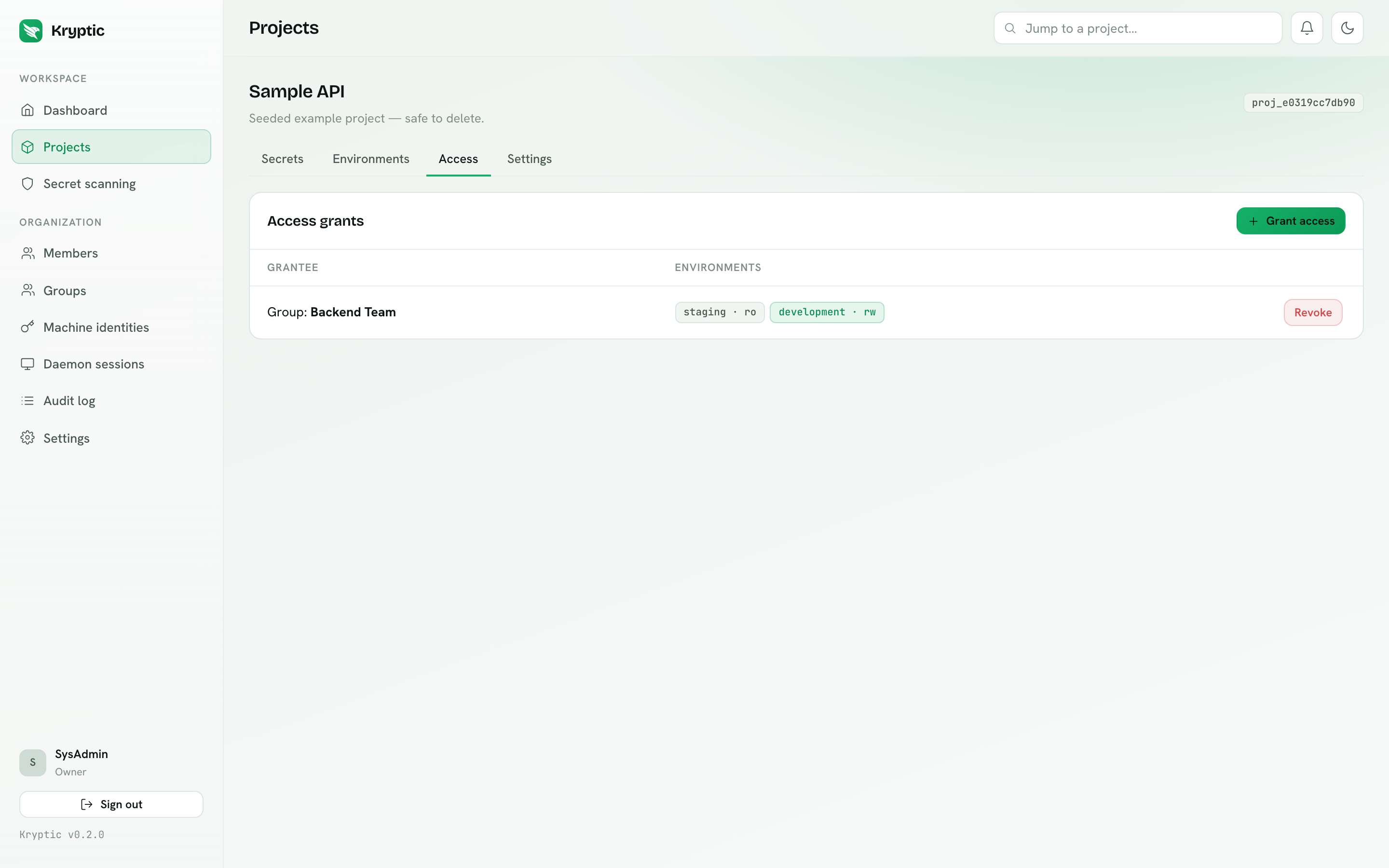
A grant ties a user or a group to a project, with a level chosen per environment. The common shape:
| Environment | Everyone | Senior engineers | Release managers |
|---|---|---|---|
| development | read | read/write | read/write |
| staging | - | read | read/write |
| production | - | read | read/write |
Effective access resolves in order: role -> direct grant -> group grant.
Groups
Granting access to a group instead of a person is what makes access survive staff changes. Add someone to "Backend Team" and they inherit every grant that group holds; remove them and the access disappears immediately. Open a group to see every project grant it holds, and who is in it.
Groups can also be populated automatically from your identity provider - see SCIM provisioning and Entra directory import.
Access requests
Developers and Viewers can request access from the Projects page, choosing environments, level and a reason. Administrators approve or deny on Approvals; approving creates the grant and notifies the requester.
Approvals also holds organization-key grants (members, devices, CI machines). That queue is independent of project access: a member can have a project grant and still be unable to decrypt until an admin seals the org key (vault unlocked).
This keeps the default posture tight without turning every onboarding into a support ticket.
Org shared secrets
The organization catalog lives on Org shared secrets. Owners and Admins author it and reveal catalog values there. Developers get key names, labels, and catalog environment slugs so they can pick an Org reference on a project. They never receive catalog envelopes from that page. Reveal of a linked project key follows the project's environment grant. Managing the catalog and creating new project links is Business and Enterprise. See Org shared secrets.
Secret change requests
Developers with write access still encrypt values in the browser, but the write
is held as a change request until an owner or admin approves it on
Approvals. The requester and reviewers can reveal the proposed value after
unlocking the vault, then approve, deny, or cancel. An org-reference request
shows the catalog key and environment mappings instead of a value. Cancelling
removes the admin notification. How long a pending change stays open is an
organization setting (Settings, permission change_requests.set_expiry):
1, 3, 7, 14, 30, or 90 days, or no expiration. The default is 7 days. Access
requests still expire after 7 days. Stale notifications are cleared when a
request expires. Owners and admins
continue to write directly on environments that are not protected.
Enterprise can protect an environment. That change then waits for a role or a
list of people who hold approvals.approve. When more than one person can
approve, the author cannot apply their own change. See
Approval workflows.
Organization isolation
Organizations are hard boundaries. A caller from one organization asking for another's project receives 404, not 403 - the existence of the resource is not disclosed. This holds across the dashboard API, the daemon BFF, the pipelines BFF and the public REST API.
Sessions and revocation
| Control | Effect |
|---|---|
| Deactivate a member | Immediately revokes their browser sessions, daemon sessions, durable devices, org-key grants, and remembered MFA browsers; login refused |
| Revoke all sessions | Revokes browser and daemon refresh tokens without deactivating the account or durable devices |
| Revoke one daemon | If the session belongs to a durable device, the device, its org-key grant, and every session on it go together |
| Session expiry policy | Caps the absolute age of any login, regardless of refreshes. Set under Settings → Authentication |
| Require MFA | Password accounts must enroll TOTP before a session is issued, including invitation accept. SSO stays on the IdP |
| Remember browser for MFA | After TOTP, that browser can skip the code for 30 days. Cleared on password change, MFA disable, and deactivate |
| Durable daemon device trust | First admin grant still required. Later logins on the same OS-user install reuse the grant. Off means approve every new daemon session |
| SCIM deprovisioning | Deactivates and revokes sessions, durable devices, and org-key grants, driven by your IdP |
Access changes take effect on the daemon's next fetch. Secrets are cached in
daemon memory for five minutes; kryptic flush clears the cache immediately if
you need to confirm a change during testing.